
前言
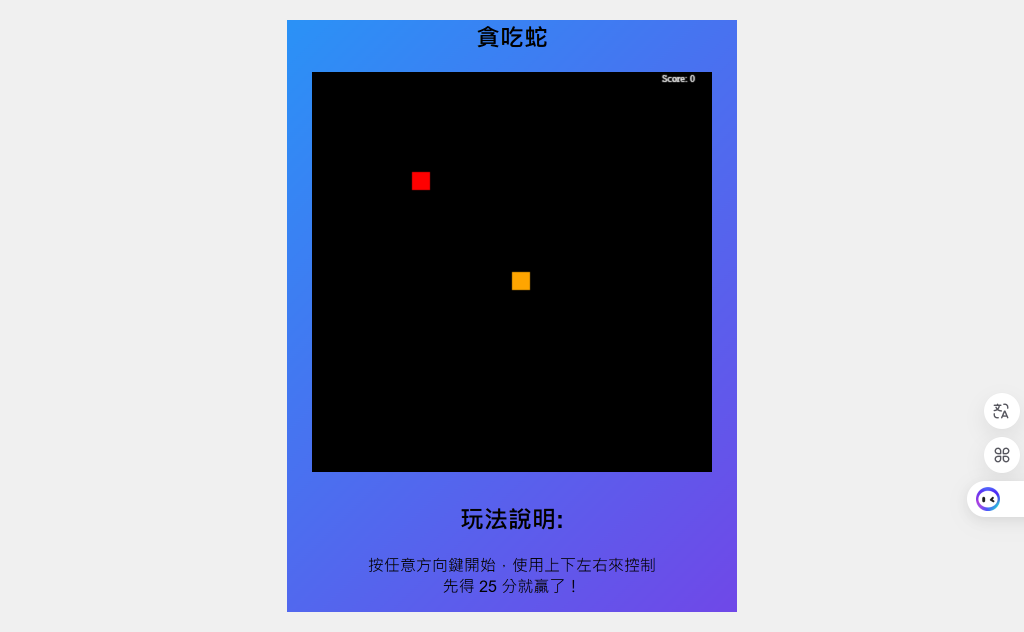
紀錄用JavaScript來練習寫一個貪吃蛇的網頁遊戲,在過程中更清楚JavaScript的使用邏輯。
HTML
<section id="snake" class="game-section">
        <h1>貪吃蛇</h1>
        <div class="flex-container">
            <canvas id="gamesnake" width="400" height="400"></canvas>
            <div>
                <h2>玩法說明:</h2>
                <p>按任意方向鍵開始,使用上下左右來控制<br>先得 25 分就贏了!</p>
            </div>
        </div>
        <script src="js/snake.js"></script> <!--要讓畫面動起來-->
</section>首先在html裡劃出一塊遊戲區出來,其中canvas他是HTML的原生標籤之一,我們可以透過JS把它當作一個白板,在上面繪製各種圖案以及動畫。
CSS
body {
            font-family: Arial, sans-serif;
            margin: 0;
            padding: 0;
            background-color: #f0f0f0;
            text-align: center;
        }
.game-section {
    margin: 20px auto;
    align-self: center;
    width: 450px;
    background: linear-gradient(135deg,#00BFFF, #8A2BE2);
    background-size: 200% 200%;
    animation: gradient 6s ease infinite;
}
@keyframes gradient {
    0% { background-position: 0% 50%; }
    100% { background-position: 100% 50%; }
}
.game-section h1{
    align-self: center;
}
.flex-container {
    display: flex;
    flex-direction: column;
    align-items: center;
    gap: 10px;
}
canvas{
    box-shadow: black 10px 10px 50px;
}
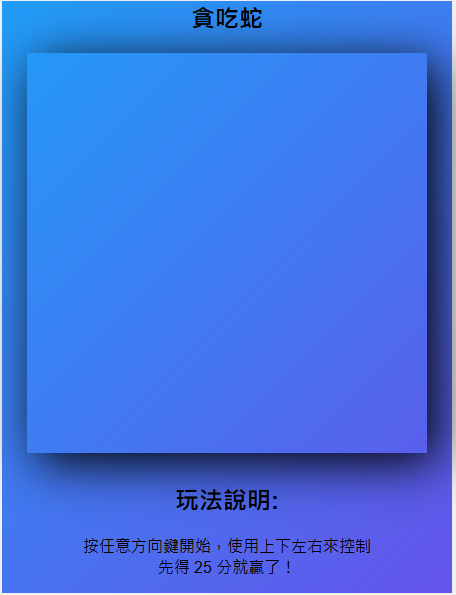
加上一些css修飾外觀,讓區塊更有遊戲區的感覺
現在畫面長這樣
JavaScript
以下是附上註解的完整js程式碼
let gameLoop; // 遊戲迴圈變數

function startGame() {
    canChangeDirection = true; // 設定可以改變方向
    snakePosition(); // 更新蛇的位置
    let lose = isOver(); // 檢查是否遊戲結束
    if(lose){
        document.body.addEventListener('keydown', playAgain); // 監聽鍵盤事件以重新開始遊戲
        clearInterval(gameLoop); // 停止遊戲迴圈
        return;
    }

    clearScreen(); // 清空畫布
    checkColli(); // 檢查是否吃到蘋果
    let win = isWin(); // 檢查是否達到勝利條件
    if(win){
        clearInterval(gameLoop); // 停止遊戲迴圈
        return;
    }
    drawApple(); // 繪製蘋果
    drawSnake(); // 繪製蛇
    drawScore(); // 顯示分數
}

const canvas = document.getElementById('gamesnake'); // 取得畫布元素
const ctx = canvas.getContext('2d'); // 取得 2D 繪圖上下文

// 蛇的身體部件類別
class SnakePart{
    constructor(x, y){
        this.x = x;
        this.y = y;
    }
}

// 阻止按鍵滾動畫面
const onkeydown = (e) => {
    const keyCodes = [40, 39, 38, 37, 32]; // 方向鍵與空白鍵
    if (keyCodes.includes(e.keyCode)) {
        e.preventDefault();
    }
}
window.addEventListener('keydown', onkeydown);
document.body.addEventListener('keydown', keyDown); // 監聽鍵盤事件控制蛇的移動

// 遊戲相關變數
let speed = 5; // 初始速度
let canChangeDirection = true; // 防止連續變更方向
let tileCount = 20; // 格子數量
let tileSize = canvas.width / tileCount - 2; // 計算每個格子的大小
let headX = 10; // 蛇頭的 X 座標
let headY = 10; // 蛇頭的 Y 座標
const snakePart = []; // 存放蛇身體的陣列
let tailLen = 0; // 蛇的初始長度

let appleX = 5; // 蘋果 X 座標
let appleY = 5; // 蘋果 Y 座標

let xV = 0; // 水平移動方向
let yV = 0; // 垂直移動方向
let score = 0; // 分數

function snakePosition() {
    headX += xV; // 根據方向更新 X 座標
    headY += yV; // 根據方向更新 Y 座標
}

// 判斷遊戲是否結束
function isOver() {
    let Over = false;
    // 撞牆
    if(headX < 0 || headX == tileCount || headY < 0 || headY == tileCount){
        Over = true;
    }
    // 撞到自己
    for(let i = 0; i < snakePart.length; i++){
        if(headX == snakePart[i].x && headY == snakePart[i].y){
            Over = true;
        }
    }
    // 遊戲結束畫面
    if(Over){
        ctx.fillStyle = "white";
        ctx.font = "50px Poppins";
        ctx.fillText("Game Over!", canvas.width/6.5, canvas.height /2);
        ctx.font = "40px Poppins";
        ctx.fillText("再玩一次?", canvas.width/3.5, canvas.height /2 + 50);
        ctx.font = "25px Poppins";
        ctx.fillText("按空白鍵", canvas.width/2.7, canvas.height /2 +100);
    }
    return Over;
}

// 按空白鍵重新開始遊戲
function playAgain(event) {
    if(event.keyCode == 32){
        location.reload();
    }
}

// 清空畫布
function clearScreen() {
    ctx.fillStyle = 'black';
    ctx.fillRect(0, 0, 400, 400);
}

// 檢查是否吃到蘋果
function checkColli() {
    if (appleX === headX && appleY === headY) {
        let newApplePosition = false;
        while (!newApplePosition) {
            appleX = Math.floor(Math.random() * tileCount);
            appleY = Math.floor(Math.random() * tileCount);
            // 確保蘋果不與蛇重疊
            newApplePosition = !snakePart.some(part => part.x === appleX && part.y === appleY);
        }
        tailLen++; // 增加蛇的長度
        score++; // 增加分數
        if (score % 2 == 0) { // 每 2 分提升速度
            speed += 1;
            updateSpeed();
        }
    }
}

// 判斷是否勝利
function isWin() {
    let win = false;
    if(score == 25){
        win = true;
    }
    if(win){
        ctx.fillStyle = "white";
        ctx.font = "50px Poppins";
        ctx.fillText("你贏了!", canvas.width/3.3, canvas.height /2)
    }
    return win;
}

// 繪製蘋果
function drawApple() {
    ctx.fillStyle = "red";
    ctx.fillRect(appleX * tileCount, appleY * tileCount, tileSize, tileSize);
}

// 繪製蛇
function drawSnake() {
    ctx.fillStyle = "green";
    for(let i = 0; i < snakePart.length; i++){
        let part = snakePart[i];
        ctx.fillRect(part.x * tileCount, part.y * tileCount, tileSize, tileSize);
    }
    snakePart.push(new SnakePart(headX, headY));
    if(snakePart.length > tailLen){
        snakePart.shift();
    }
    ctx.fillStyle = 'orange';
    ctx.fillRect(headX * tileCount, headY * tileCount, tileSize, tileSize);
}

// 繪製分數
function drawScore() {
    ctx.fillStyle = "white";
    ctx.font = "10px Poppins";
    ctx.fillText("Score: " + score, canvas.width-50, 10);
}

// 控制蛇的移動方向
function keyDown(event) {
    if(!canChangeDirection) return;
    if(event.keyCode == 38 && yV !== 1) { yV = -1; xV = 0; canChangeDirection = false; }
    if(event.keyCode == 40 && yV !== -1) { yV = 1; xV = 0; canChangeDirection = false; }
    if(event.keyCode == 37 && xV !== 1) { yV = 0; xV = -1; canChangeDirection = false; }
    if(event.keyCode == 39 && xV !== -1) { yV = 0; xV = 1; canChangeDirection = false; }
}

// 更新遊戲速度
function updateSpeed() {
    clearInterval(gameLoop);
    gameLoop = setInterval(startGame, 1000 / speed);
}
updateSpeed();
完整程式碼
<!DOCTYPE html>
<html lang="en">
<head>
    <meta charset="UTF-8">
    <title>Title</title>
    <style>
        body {
            font-family: Arial, sans-serif;
            margin: 0;
            padding: 0;
            background-color: #f0f0f0;
            text-align: center;
        }
        .game-section {
            margin: 20px auto;
            align-items: center;
            align-self: center;
            width: 450px;
            background: linear-gradient(135deg,#00BFFF, #8A2BE2);
            background-size: 200% 200%;
            animation: gradient 6s ease infinite;
        }
        @keyframes gradient {
            0% {
                background-position: 0% 50%;
            }
            100% {
                background-position: 100% 50%;
            }
        }
        .flex-container {
            display: flex;
            flex-direction: column;
            align-items: center;
            gap: 10px;
        }
    </style>
</head>
<body>
<main>
<section id="snake" class="game-section">
    <h1>貪吃蛇</h1>
    <div class="flex-container">
        <canvas id="gamesnake" width="400" height="400"></canvas>
        <div>
            <h2>玩法說明:</h2>
            <p>按任意方向鍵開始,使用上下左右來控制<br>先得 25 分就贏了!</p>
        </div>
    </div>

</section>
</main>

<script>
    let gameLoop;
    function startGame() {
        canChangeDirection = true;
        snakePosition();//管理與調整snake的位置
        let lose = isOver();//判斷遊戲結束沒
        if(lose){
            document.body.addEventListener('keydown', playAgain);//確認是否再玩一次
            clearInterval(gameLoop); // 停止遊戲迴圈
            return;
        }

        clearScreen();//初始化遊戲畫面
        checkColli();//確認蛇和蘋果的碰撞
        let win = isWin();//確認勝利條件
        if(win){
            clearInterval(gameLoop); // 停止遊戲迴圈
            return;
        }
        drawApple();//生產蘋果方塊
        drawSnake();//生產蛇方塊
        drawScore();//顯示分數
    }

    const canvas = document.getElementById('gamesnake');
    const ctx = canvas.getContext('2d');

    class SnakePart{
        constructor(x, y){
            this.x = x;
            this.y = y;
        }
    }

    const onkeydown = (e) => {
        // 阻止上下左右键触发浏览器滚动条的默认行为,
        const keyCodes = [40, 39, 38, 37, 32];
        if (keyCodes.includes(e.keyCode)) {
            e.preventDefault();
        }
    }

    window.addEventListener('keydown', onkeydown);
    document.body.addEventListener('keydown', keyDown);

    let speed = 5;
    let canChangeDirection = true;
    let tileCount = 20;
    let tileSize = canvas.width / tileCount - 2;
    let headX = 10;
    let headY = 10;
    const snakePart = [];
    let tailLen = 0;

    let appleX = 5;
    let appleY = 5;

    let xV = 0;
    let yV = 0;
    let score = 0;
    let move_dir = 0;

    function snakePosition() {
        headX = headX + xV;
        headY = headY + yV;
    }

    function isOver() {
        let Over = false;
        if(headX < 0 || headX == tileCount || headY < 0 || headY == tileCount){
            Over = true;
        }
        for(let i = 0; i < snakePart.length; i++){
            if(headX == snakePart[i].x && headY == snakePart[i].y){
                Over = true;
            }
        }
        if(Over){
            ctx.fillStyle = "white";
            ctx.font = "50px Poppins";
            ctx.fillText("Game Over!", canvas.width/6.5, canvas.height /2);
            ctx.font = "40px Poppins";
            ctx.fillText("再玩一次?", canvas.width/3.5, canvas.height /2 + 50 );
            ctx.font = "25px Poppins";
            ctx.fillText("按空白鍵", canvas.width/2.7, canvas.height /2 +100 );
        }
        return Over;
    }
    function playAgain(event) {
        if(event.keyCode == 32){
            location.reload();
        }
    }
    function clearScreen() {
        ctx.fillStyle= 'black';
        ctx.fillRect(0, 0, 400, 400);
    }
    function checkColli() {
        if (appleX === headX && appleY === headY) {
            let newApplePosition = false;
            while (!newApplePosition) {
                appleX = Math.floor(Math.random() * tileCount);
                appleY = Math.floor(Math.random() * tileCount);
                // 確保蘋果不會與蛇重疊
                newApplePosition = !snakePart.some(part => part.x === appleX && part.y === appleY);
            }
            tailLen++;
            score++;
            if (score % 2 == 0) {
                speed += 1;
                updateSpeed();
            }
        }
    }
    function isWin() {
        let win = false;
        if(score == 25){
            win = true;
        }
        if(win){
            ctx.fillStyle = "white";
            ctx.font = "50px Poppins";
            ctx.fillText("你贏了!", canvas.width/3.3, canvas.height /2)
        }
        return win;
    }
    function drawApple() {
        ctx.fillStyle = "red";
        ctx.fillRect(appleX * tileCount, appleY * tileCount, tileSize, tileSize);
    }
    function drawSnake() {

        ctx.fillStyle = "green";
        for(let i = 0; i< snakePart.length; i++){
            let part = snakePart[i];
            ctx.fillRect(part.x * tileCount, part.y * tileCount, tileSize, tileSize);
        }

        snakePart.push( new SnakePart(headX, headY));
        if(snakePart.length > tailLen){
            snakePart.shift();
        }

        ctx.fillStyle = 'orange';
        ctx.fillRect(headX * tileCount, headY *tileCount, tileSize, tileSize);
    }

    function drawScore() {
        ctx.fillStyle = "white";
        ctx.font = "10px Poppins";
        ctx.fillText("Score: " + score, canvas.width-50, 10);
    }

    function keyDown(event) {
        if(!canChangeDirection) return;
        //go up
        if(event.keyCode== 38){
            if(yV == 1)
                return;
            yV = -1;
            xV = 0;
            canChangeDirection = false;
        }

        //go down
        if(event.keyCode == 40){
            if(yV == -1)
                return;
            yV = 1;
            xV = 0;
            canChangeDirection = false;
        }

        //go left
        if(event.keyCode == 37){
            if(xV == 1)
                return;
            yV = 0;
            xV = -1;
            canChangeDirection = false;
        }

        //go right
        if(event.keyCode == 39){
            if(xV == -1)
                return;
            yV = 0;
            xV = 1;
            canChangeDirection = false;
        }

    }

    function updateSpeed() {
        clearInterval(gameLoop);
        gameLoop = setInterval(startGame, 1000 / speed);
    }
    updateSpeed();
</script>
</body>
</html>